

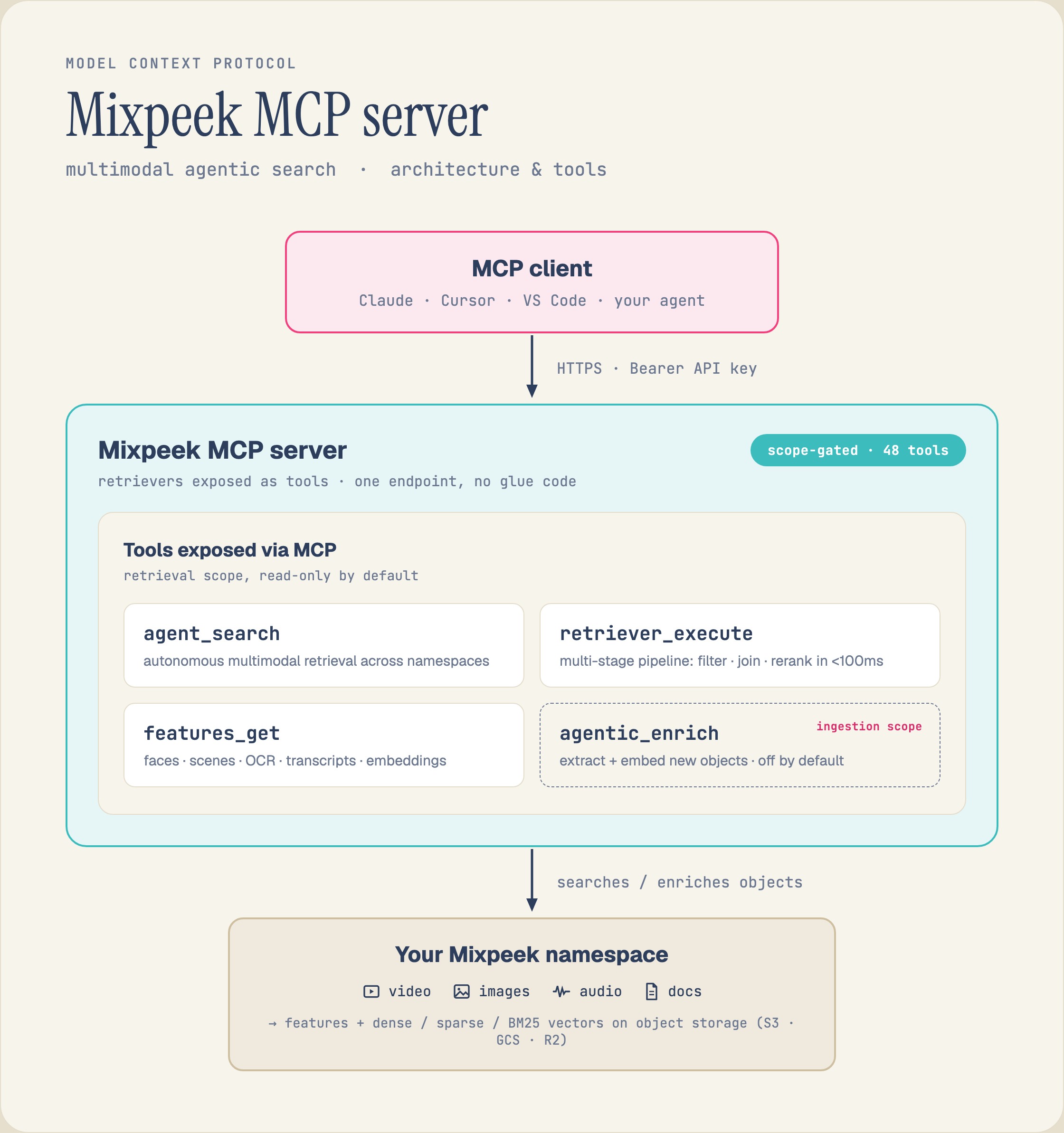
An MCP client (Claude, Cursor, VS Code, or your agent) authenticates with a Bearer API key and gets scope-gated tools — agent_search, retriever_execute, features_get, and (ingestion scope, off by default) agentic_enrich — that search and enrich the multimodal features and vectors in your Mixpeek namespace.
Hosted Server URLs
Mixpeek runs five hosted MCP servers. Each exposes a different subset of tools, so you load only what your agent needs.
The App server is read-only. You sign in with your Mixpeek account in the browser, so you never paste a key into the client. See Sign in with OAuth.
Setup
ReplaceYOUR_API_KEY with your key from the Mixpeek Studio. To connect without a key, use the App server over OAuth.
- Claude Desktop
- Claude Code
- Cursor
Add this to your Claude Desktop config file (
claude_desktop_config.json):Sign in with OAuth
The App server athttps://mcp.mixpeek.com/app/mcp uses OAuth 2.1. It exposes 9 read-only tools: list and read namespaces, collections, documents and retrievers, run a retriever, and search a namespace.
- Add the URL to your client with no
Authorizationheader. - On first connect, the server answers
401with aWWW-Authenticateheader that names its metadata athttps://mcp.mixpeek.com/.well-known/oauth-protected-resource/app/mcp. - Your client opens the Mixpeek sign-in page at
auth.mixpeek.comand requests themixpeek:readscope. - After you approve, the client stores the token and the tools load.
Authorization: Bearer YOUR_API_KEY.
Per-Retriever MCP Server
The retriever server is a lightweight MCP server scoped to a single retriever. It reads your retriever’sinput_schema at startup and generates a typed search tool whose parameters match exactly.
1
Install
2
Run
3
Connect
Add to your Claude Desktop config:
If your retriever’s
input_schema has a field named page or page_size, the pagination parameters are automatically renamed to _pagination_page and _pagination_page_size to avoid conflicts.RETRIEVER_MCP_):
Available Tools by Scope
Thefull scope serves all 91 tools. The App scope is a read-only subset of them. The three key-based scopes below overlap: list_storage_connections and get_storage_connection are in two of them, which is why the per-scope counts sum to more than the total.
Ingestion — 29 tools
Retrieval — 21 tools
Admin — 43 tools
App — 9 tools
Served athttps://mcp.mixpeek.com/app/mcp behind OAuth. Every tool is read-only.
Authentication
The Full, Ingestion, Retrieval and Admin servers authenticate with your Mixpeek API key. The key carries the same RBAC permissions as the REST API. The App server uses OAuth instead.- App server: Your client signs you in through OAuth 2.1 with the
mixpeek:readscope. See Sign in with OAuth. - Hosted servers (HTTP): Pass the key in the
Authorization: Bearer YOUR_API_KEYheader. The server injects it into every tool call. - Stdio servers: Set the
MIXPEEK_API_KEYenvironment variable, or pass--api-keyas a CLI argument.
Example Conversation
Here is what a session looks like with the Retrieval server connected:Architecture
/ingestion, /retrieval, /admin) while the full server runs at /mcp. The App server runs at /app/mcp.
Troubleshooting
Claude can't connect to the MCP server
Claude can't connect to the MCP server
- Verify the URL is correct (e.g.
https://mcp.mixpeek.com/ingestion/mcp) - Check that the
Authorizationheader format isBearer YOUR_API_KEY - Restart Claude Desktop or Claude Code after changing config
Tool not found (404)
Tool not found (404)
- You may be calling a tool on the wrong scoped server (e.g.
execute_retrieveron/ingestion) - Use the full server if you need all tools
Retriever Server fails to start
Retriever Server fails to start
- Ensure
--retriever-idand--namespace-idare correct - Verify the API key has access to that namespace
- Check that the retriever exists via the API
Search returns empty results
Search returns empty results
- Confirm your collection has processed documents (not just uploaded files)
- Check that the retriever’s
feature_urimatches your collection’s extractor - Try a broader query or remove optional filters
Next Steps
LangChain Integration
Use Mixpeek as a LangChain tool
Retriever Stages
Configure multi-stage search pipelines
Feature Extractors
Choose the right extractor for your data
Core Concepts
Understand namespaces, collections, and documents