> ## Documentation Index
> Fetch the complete documentation index at: https://docs.mixpeek.com/docs/llms.txt
> Use this file to discover all available pages before exploring further.
# Quickstart
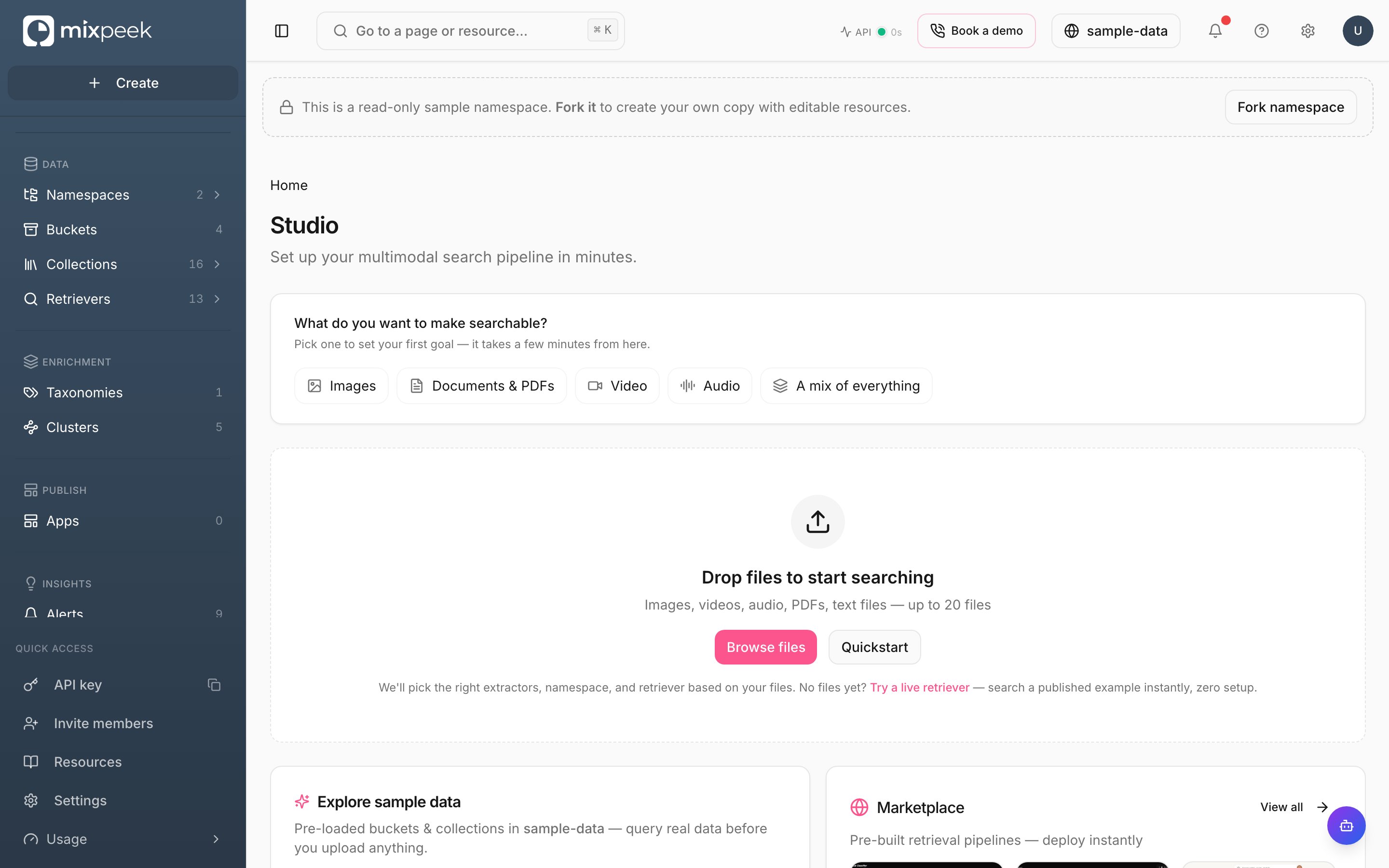 Studio is the visual interface for the multimodal data warehouse, where you manage namespaces, collections, and retrievers.
### Use the Studio to manage your organization
* **Set active namespace**: Use the top bar namespace switcher. All actions scope to this selection. Namespaces mirror API behavior for `X-Namespace`. Create one in Studio or via [Create Namespace](/docs/api-reference/namespaces/create-namespace).
* **Create buckets**: Define schemas to validate your objects. Buckets are the entry point for raw data. See [Create Bucket](/docs/api-reference/buckets/create-bucket) and [Create Object](/docs/api-reference/bucket-objects/create-object).
* **Create collections**: Point to a source and pick [features](/docs/processing/features). Collections produce searchable documents and vectors. See [Create Collection](/docs/api-reference/collections/create-collection) and [Describe Features](/docs/api-reference/collections/describe-collection-features).
* **Ingest data**: Upload objects to buckets, optionally in batches. Processing runs in the Engine and writes documents to your namespace.
* **Explore results**: Use `Explorer` to search, filter, and preview documents with presigned URLs.
* **Build retrievers**: Configure stages, test inputs, and save pipelines to power your apps. See [Create Retriever](/docs/api-reference/retrievers/create-retriever) and [Execute Retriever](/docs/api-reference/retrievers/execute-retriever).
* **Enrich with taxonomies**: Attach flat or hierarchical taxonomies on-demand or materialized. See [Create Taxonomy](/docs/api-reference/taxonomies/create-taxonomy) and [Test Taxonomy](/docs/api-reference/taxonomies/test-taxonomy-configuration-validation-only).
* **Discover with clusters**: Run clustering jobs and apply enrichment back to collections. See [Create Cluster](/docs/api-reference/clusters/create-cluster) and [Execute Clustering](/docs/api-reference/clusters/execute-clustering).
### Tips
* **Auth is automatic in Studio**: Your API key and `X-Namespace` header are handled for you. When calling APIs directly, include both.
* **Rate limits and health**: Check `Operations` for service health and limits. API reference: [Healthcheck](/docs/api-reference/health/healthcheck) and [Limits](/docs/troubleshoot/limits).
Use the top bar switcher. This scopes all actions and mirrors the `X-Namespace` header.
Define schemas, then register objects. Buckets are your raw input boundary.
Pick features and index configs; this produces searchable documents and vectors.
Upload objects or submit batches; the Engine writes vectors and payloads to [MVS](https://mixpeek.com/mvs).
Use Explorer for ad-hoc discovery and Retrievers for production search.
Attach taxonomies on-demand or materialize; run clustering for discovery and analytics.
Studio follows Mintlify component patterns for clarity and scannability; see the Mintlify starter for examples.
Studio is the visual interface for the multimodal data warehouse, where you manage namespaces, collections, and retrievers.
### Use the Studio to manage your organization
* **Set active namespace**: Use the top bar namespace switcher. All actions scope to this selection. Namespaces mirror API behavior for `X-Namespace`. Create one in Studio or via [Create Namespace](/docs/api-reference/namespaces/create-namespace).
* **Create buckets**: Define schemas to validate your objects. Buckets are the entry point for raw data. See [Create Bucket](/docs/api-reference/buckets/create-bucket) and [Create Object](/docs/api-reference/bucket-objects/create-object).
* **Create collections**: Point to a source and pick [features](/docs/processing/features). Collections produce searchable documents and vectors. See [Create Collection](/docs/api-reference/collections/create-collection) and [Describe Features](/docs/api-reference/collections/describe-collection-features).
* **Ingest data**: Upload objects to buckets, optionally in batches. Processing runs in the Engine and writes documents to your namespace.
* **Explore results**: Use `Explorer` to search, filter, and preview documents with presigned URLs.
* **Build retrievers**: Configure stages, test inputs, and save pipelines to power your apps. See [Create Retriever](/docs/api-reference/retrievers/create-retriever) and [Execute Retriever](/docs/api-reference/retrievers/execute-retriever).
* **Enrich with taxonomies**: Attach flat or hierarchical taxonomies on-demand or materialized. See [Create Taxonomy](/docs/api-reference/taxonomies/create-taxonomy) and [Test Taxonomy](/docs/api-reference/taxonomies/test-taxonomy-configuration-validation-only).
* **Discover with clusters**: Run clustering jobs and apply enrichment back to collections. See [Create Cluster](/docs/api-reference/clusters/create-cluster) and [Execute Clustering](/docs/api-reference/clusters/execute-clustering).
### Tips
* **Auth is automatic in Studio**: Your API key and `X-Namespace` header are handled for you. When calling APIs directly, include both.
* **Rate limits and health**: Check `Operations` for service health and limits. API reference: [Healthcheck](/docs/api-reference/health/healthcheck) and [Limits](/docs/troubleshoot/limits).
Use the top bar switcher. This scopes all actions and mirrors the `X-Namespace` header.
Define schemas, then register objects. Buckets are your raw input boundary.
Pick features and index configs; this produces searchable documents and vectors.
Upload objects or submit batches; the Engine writes vectors and payloads to [MVS](https://mixpeek.com/mvs).
Use Explorer for ad-hoc discovery and Retrievers for production search.
Attach taxonomies on-demand or materialize; run clustering for discovery and analytics.
Studio follows Mintlify component patterns for clarity and scannability; see the Mintlify starter for examples.